Microsoft 365 Partner GDAP
This community node is no longer maintained. For multi-tenant Microsoft 365 automation, we recommend CIPP.Deprecated
@mspcopilot/n8n-nodes-microsoft-partner-gdap. It never
left beta, and it stayed limited to Microsoft Graph GET calls. Existing installs keep
working, but we aren't shipping fixes or new operations, and we don't recommend new installs.
Use CIPP instead. Its API covers far more of the partner surface than this node ever did, and you can reach it from n8n with a community CIPP node or a plain HTTP Request node.
Why we recommend CIPP
CIPP (the CyberDrain Improved Partner Portal) is an open-source multi-tenant management portal for Microsoft 365 partners. It handles GDAP relationships, tenant onboarding, standards, and reporting, and every action it exposes in the UI is also available through its API.
Broad API Coverage
Read and write operations across users, licensing, policies, and tenant standards, not just Graph GET calls.
Works With Any n8n Node
Authenticate once and call CIPP from the built-in HTTP Request node. No community node to install or keep updated.
Actively Maintained
A large open-source community keeps CIPP current with Microsoft partner and GDAP changes. Ours was one node.
Community CIPP nodes for n8n
Several people have published CIPP nodes to npm. None are official or n8n-verified, so you'll need self-hosted n8n and you should pin a version. These are the three worth looking at first.
n8n-nodes-cipp-advanced
MIT · our default recommendation
The most complete curated node. Roughly 476 operations across 29 resources, a searchable tenant dropdown with
caching, field pickers so you don't have to memorise Graph property names, and operations exposed as AI agent
tools. It's a rewrite of the @joshuanode node below, audited against the CIPP
OpenAPI spec.
@avantguardllc/n8n-nodes-cipp
MIT · widest raw coverage
Auto-generated from static analysis of the CIPP API and frontend repos, so it wraps the most endpoints of any node here (~560 across 43 groups). The trade-off is a bare-bones experience: generic OAuth2 credentials, no tenant dropdown, and no public source repository to file issues against. Reach for it when you need an endpoint nothing else wraps.
@joshuanode/n8n-nodes-cipp
MIT · the original curated node
Around 317 operations across 29 resources with a tenant selector and field pickers. Still maintained and still
self-labelled beta. Worth knowing about as the upstream of cipp-advanced, and
a reasonable pick if you want the smaller of the two.
A few smaller CIPP nodes also exist on npm, covering 11 to 140 operations. Check publish dates and operation coverage before committing to one, since these projects move at very different speeds.
What the node did
Kept here for anyone still running it. The node used a single set of partner credentials to reach every
GDAP-enabled tenant, offered a tenant dropdown, and cached OAuth tokens in memory. It supported Microsoft Graph
GET operations only.
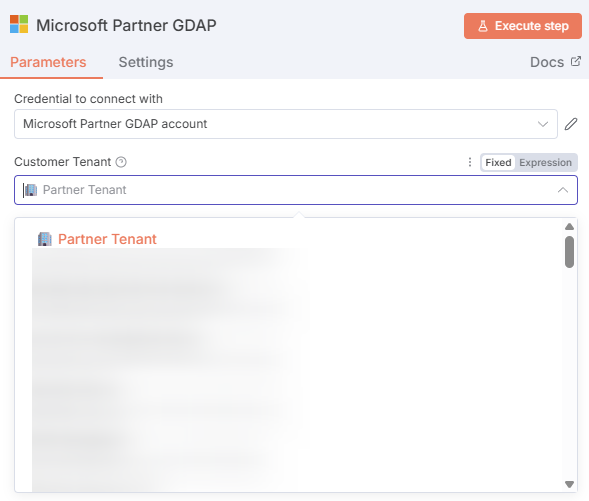
The tenant dropdown listed every tenant you had GDAP access to
Use CIPP for Microsoft 365 Partner Automation
It's open source, actively maintained, and its API covers the partner operations this node never reached.